Blog / Technology

Mazda Push Button Start Positions

Mazda push-button start

The Mazda push button start system is a convenient feature that allows you to start your vehicle without using a traditional key. It adds modern convenience, improves security, and gives your driving experience a sleek, high-tech feel compared to traditional ignition systems.

If you’ve never used a vehicle with Mazda push button start, it can be confusing at first! Don’t worry, we’ll walk you through exactly how it works so you’ll have no problem adapting to your new Mazda from Seacoast Mazda. Once you understand the steps, you’ll see just how simple and convenient this feature really is.

How to Use Mazda Push Button Start

Shift the vehicle into “Park” or “Neutral” position in order to start the engine with an automatic transmission.

Now, depress the brake pedal. If you’re in a manual transmission, shift into neutral and depress your clutch.

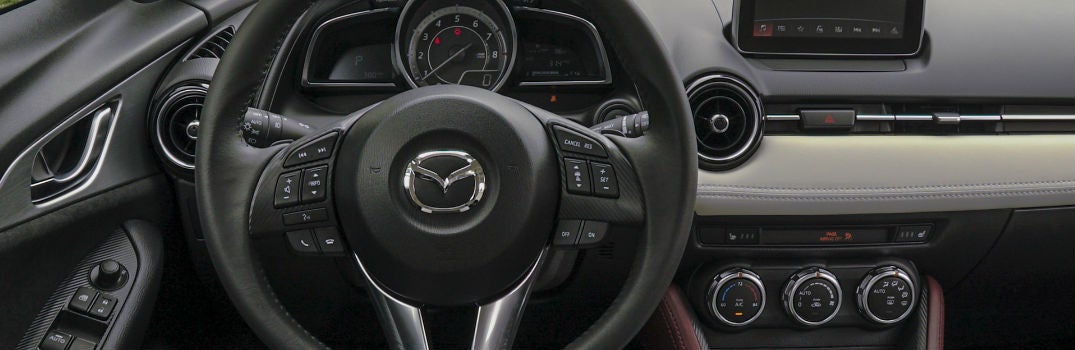
Located the START STOP ENGINE button on the right side of your steering wheel. Once the green indicator light appears, press the button. It’s important to let the engine idle for at least 10 seconds after it starts.

To stop the engine in an automatic transmission, shift back into “Park” or shift your manual transmission to neutral. Press the push-button start button to turn the engine completely off.

If you’d like to activate the accessory mode, press the push-button start once

Schedule a Test Drive

Schedule Service

Mazda Push Button Start In Emergency Situations

The system also includes safety features in case of emergencies. If the vehicle isn’t moving, press the Mazda push button start continuously until the engine shuts off.

If the vehicle is moving and you need to shut off the engine, quickly press the push-button a continuous number of times until the engine shuts off.

You can also start the engine with a dead key battery. You’ll need to pull the auxiliary from the key and use the auxiliary key to unlock the door. Follow the same steps as above. A green indicator light should illuminate after you have depressed the brake. From here, touch the push-button start button with the backside of your key while the green indicator light flashes. When the light finally turns green it means you are ready to go!

Why Is My Mazda Push-Button Start Light Red?

If the light on your Mazda push button start system turns red instead of the usual green, it often signals a problem with the system. Understanding the possible causes can help you quickly identify whether it’s a simple fix (like a key fob battery) or if you should seek professional service. Here are a few reasons for the red light:

Key Fob Battery: The key fob's battery might be low or dead. If it's weak, it may not communicate properly with the car, causing the red light. Try changing the key fob batteries to see if that helps.

Anti-Theft System: The anti-theft system could be triggered. This happens if there's a sudden communication issue between the key fob and the car, like when the battery is replaced. In such cases, the push button start shows a red light, and the key warning indicator may flash. You may need to reset the anti-theft system or have the car checked by a Mazda professional.

Malfunction: A red light may indicate a problem with the push button start itself, like wiring issues, a faulty switch, or internal problems. If changing the key fob batteries doesn't work, it's best to have the car inspected by a Mazda dealer or repairer to find and fix the problem.

What to Do When a Push-Button Car Won’t Start?

A Mazda push button start system is designed to fire up your engine with minimal effort, so when nothing happens, it can feel confusing. The good news is that most causes are minor and easy to troubleshoot on the spot. Start with the basics. Make sure the vehicle is in Park or Neutral and press the brake pedal firmly. If you’re using a manual transmission, shift to neutral and fully depress the clutch.

Check Your Key Fob

If the engine still won’t start, your key fob may not be detected. A weak or dead key fob battery is one of the most common reasons a push button vehicle refuses to start. Hold the key fob directly against the push button and try again. Many Mazda models allow the system to read the chip inside the fob even when the battery is low.

Check For Warning Lights

You should also check for warning lights on your dashboard. A red key indicator, a push button start warning, or a flashing immobilizer light usually means the car isn’t communicating with the key or the anti theft system has activated. Lock and unlock the car, then try starting again.

Listen for Symptoms

If the vehicle still won’t start, listen for symptoms. A clicking noise often points to a weak car battery. Dimming lights or slow electronics confirm this. If the dash is completely dark, your car battery may be fully discharged and you’ll likely need a jump start.

What Else to Try

When everything looks normal but the engine stays silent, there may be an issue with the brake switch, the starter, or the push button system itself. In those cases, it’s best to have the vehicle inspected by a Mazda technician to diagnose the problem safely.

Remember, these are general possibilities, and the specific cause may depend on your Mazda's model and year. If you're facing this issue, check your vehicle's manual or contact a Mazda dealership for help.
Posted in:

Related Posts

what's included with Mazda i-ACTIVSENSE

What’s included with Mazda i-ACTIVSENSE?

Designed to improve safety on the road, Mazda i-ACTIVSENSE includes a suite of protective technologies. Each one plays a unique role in keeping riders safe and assisting the driver through milliwave radars and cameras. Here are some of the features included with Mazda i-ACTIVSENSE. more You may also like: Advanced driver assistance systems in the 2017 Mazda6 Adaptive Front-lighting System - optimizes headlight distribution by pointing the headlights toward the direction you’re traveling, even around curves High-Beam Control - automatically switches between high and low beams depending on whether or not any oncoming or preceding vehicles are detected Mazda Radar Cruise Control - utilizes millimeter wave radar to maintain a set speed and distance behind the car ahead of you, automatically adjusts your speed accordingly Rear Vehicle Monitoring System - monitors cars approaching from behind or in adjacent lanes and warns you about any potential danger when switching lanes Lane Departure Warning System - detects lane markings and provides a warning if it senses you switching lanes unintentionally Forward Obstruction Warning - uses millimeter wave radar to monitor the road ahead and warns you about any obstacles it detects Mazda is also working on implementing Mazda Co-Pilot, an emerging technology using autonomous driving features to monitor the driver as well as the vehicle’s behavior. Should the driver become incapacitated, the Mazda Co-Pilot can take control, steer the vehicle to a safe location, then call emergency services. If you would like to experience Mazda i-ACTIVSENSE in person, feel free to check out our new Mazda inventory at Seacoast Mazda and schedule a time to get behind the wheel at your convenience. New Mazda Inventory

Mazda owner connecting their phone to their car to enable Android Auto

Do Mazda Cars Have Apple CarPlay and Android Auto?

We use our smartphones constantly, whether we're navigating to a new restaurant or streaming music on a road trip. It's no surprise that seamless smartphone integration has become one of the top priorities for car buyers. If you're considering a Mazda, you're probably asking: does Mazda have Apple CarPlay and Android Auto? The short answer: Yes, modern Mazda vehicles support both Apple CarPlay and Android Auto. Here's everything you need to know. Which Mazda Models Have Apple CarPlay and Android Auto? Mazda began rolling out Apple CarPlay and Android Auto support starting with select 2019 and 2020 models, and the feature has since become standard across the lineup. Current Mazda models, including the Mazda3, Mazda CX-5, CX-50, CX-90, and others, come equipped with both systems as standard or available features. If you're shopping for an older used Mazda, it's worth checking the specific model year, as pre-2019 vehicles may only feature the standalone Mazda Connect infotainment system without CarPlay or Android Auto support. more Schedule a Test Drive What Is Mazda Connect? Mazda Connect is Mazda's proprietary infotainment platform, available across most models in the lineup. It supports: Bluetooth audio streaming and hands-free calling Web-based apps and services Over-the-air software updates to keep your system current Apple CarPlay and Android Auto (on compatible model years) The system is controlled via a central commander dial, keeping touchscreen interaction minimal for safer driving. How to Connect Apple CarPlay or Android Auto in a Mazda Connect your iPhone (CarPlay) or Android phone (Android Auto) via USB cable, or wirelessly on newer models that support it. Your phone's interface will automatically appear on the Mazda display. Use voice commands, the commander dial, or the touchscreen to navigate. Is Mazda CarPlay Wireless? Some newer Mazda models support wireless Apple CarPlay and Android Auto, eliminating the need for a cable. Check your specific model year's specs to confirm wireless support. Schedule a Test Drive Want to experience Mazda's infotainment system firsthand? Schedule a test drive at your local Mazda dealership to explore Apple CarPlay, Android Auto, and Mazda Connect in action.

how to stream audio in 2017 Mazda3

How to stream audio in the 2017 Mazda3

When you invest in a new vehicle, chances are it offers several high-tech features that you may not be sure how to use. For instance, if you own a 2017 Mazda3, there are a few ways for you to stream audio from your phone so you can enjoy your favorite tunes. We have put together a list of audio options to get you started. more 1. Bluetooth® hands-free audio streaming capability Along with MAZDA CONNECT® all Mazda3 trims come equipped with Bluetooth® capabilities, which allows for hands-free streaming using voice commands and steering wheel controls. This allows you to connect your phone wirelessly and listen to audio from your phone, including apps like Spotify and Pandora. 2. Auxiliary audio input jack All Mazda3 trims also come with an auxiliary audio input jack, which lets you plug in your phone or other audio listening devices using a compatible cord and listening to your music that way. 3. USB Audio Input When you need to charge your device but would also like to stream audio, the USB Audio Input is the right option for you. Using your phone's USB charging cord, you can listen to your favorite playlists while also re-charging. MAZDA CONNECT™ audio listening options In addition to the options mentioned above, MAZDA CONNECT™ also comes with a number of audio apps, such as: Aha™ HD Radio™ Pandora® Stitcher™ The MAZDA CONNECT™ infotainment system is standard equipment on all 2017 Mazda3 trims and features a 7-inch touch screen display as well as steering wheel-mounted audio controls for drivers and passengers to easily manage the audio options. If you would like more information about your 2017 Mazda3, including audio streaming, color options, or something else, feel free to reach out to our team at Seacoast Mazda. We would be happy to help you out! Contact Us